Ever wondered who checks out your profile but never likes or comments? Or if someone’s been creeping on your Instagram but never leaves a trace? You’re not alone! Many users wish they could see who views theirInstagramprofile.
Instagram keeps your profile viewers a secret to protect users’ privacy; they might track the number of users who visit your page, but you can’t see the names of who views your Instagram profile. Imagine if everyone on Instagram knew exactly who peeked at their profile! It could turn casual browsing into a stressful experience. After all, some users enjoy Instagram without liking or commenting, and if they feel exposed, they might stop using the platform altogether. So, keeping profile views hidden encourages relaxed browsing and keeps everyone engaged with Instagram.

In short, you can’t directly see individual profile viewers due to obvious privacy reasons. However, there are indirect ways to do the same. So, let’s explore ways to understand who’s engaging with your Instagram content.
Upgrade to Professional Account to See Who Views Your Instagram Profile
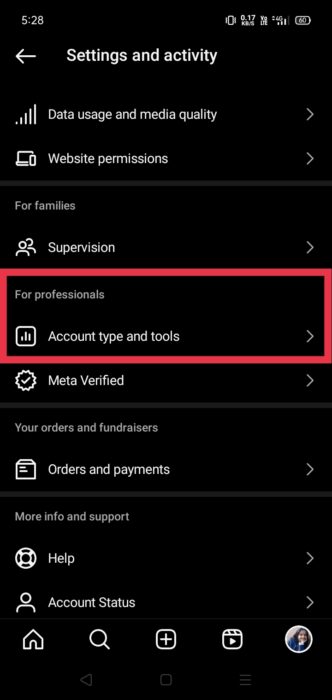
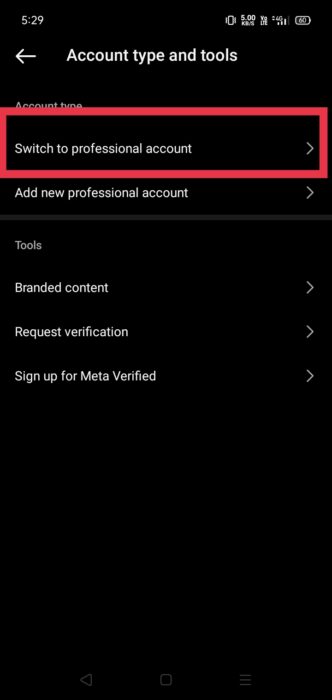
Regular accounts can’t see how many people actually view their posts. But switching to a business or creator account gives you a free tool called Insights. This feature provides detailed analytics about your audience and how they interact with your content. It’s like a secret tool that shows who liked your posts and videos, including Stories and live videos and also how many people saw them.
Following are the steps to access detailed analytics and gain valuable insights about who your audience is and how your content is performing.
How to Identify Viewers Through Your Instagram Story?
Identifying who views your Instagram Stories provides indirect insights into your profile viewers. While Instagram does not offer a direct feature to see who visits your profile, Story views can give you a good idea of who is regularly engaging with your content.
To identify viewers through your Instagram Story, open the Instagram app and access your Story by tapping your profile picture. While viewing your Story, swipe up on the screen to see a list of people who have viewed it. This list displays the usernames of those who have seen your Story by the order they viewed it. Additionally, interactions such as responses to polls or messages will also be displayed here, giving you insights into who is engaging with your content.
Are External Apps Helpful for Seeing Your Profile Viewers?
No, external apps are not reliable for seeing your Instagram profile viewers. Instagram’s API does not allow third-party apps to track profile views, and using such apps can compromise your account’s security and privacy. Stick to Instagram’s built-in features for safe and accurate insights.
